
Brake Light Switch Relay Instructions
Here are the brake light switch relay instructions for connecting up the plugpal brake light pressure switch relay and the plugpal brake light pedal switch relay
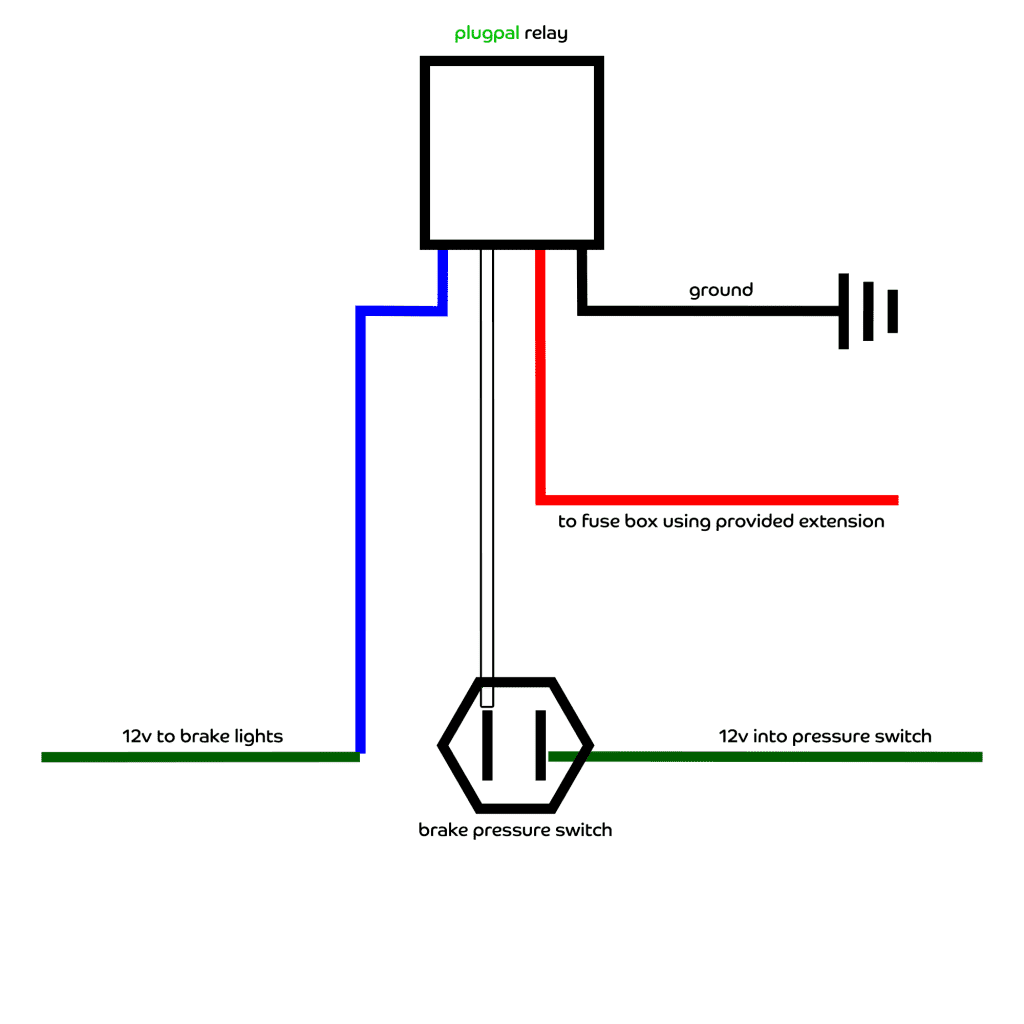
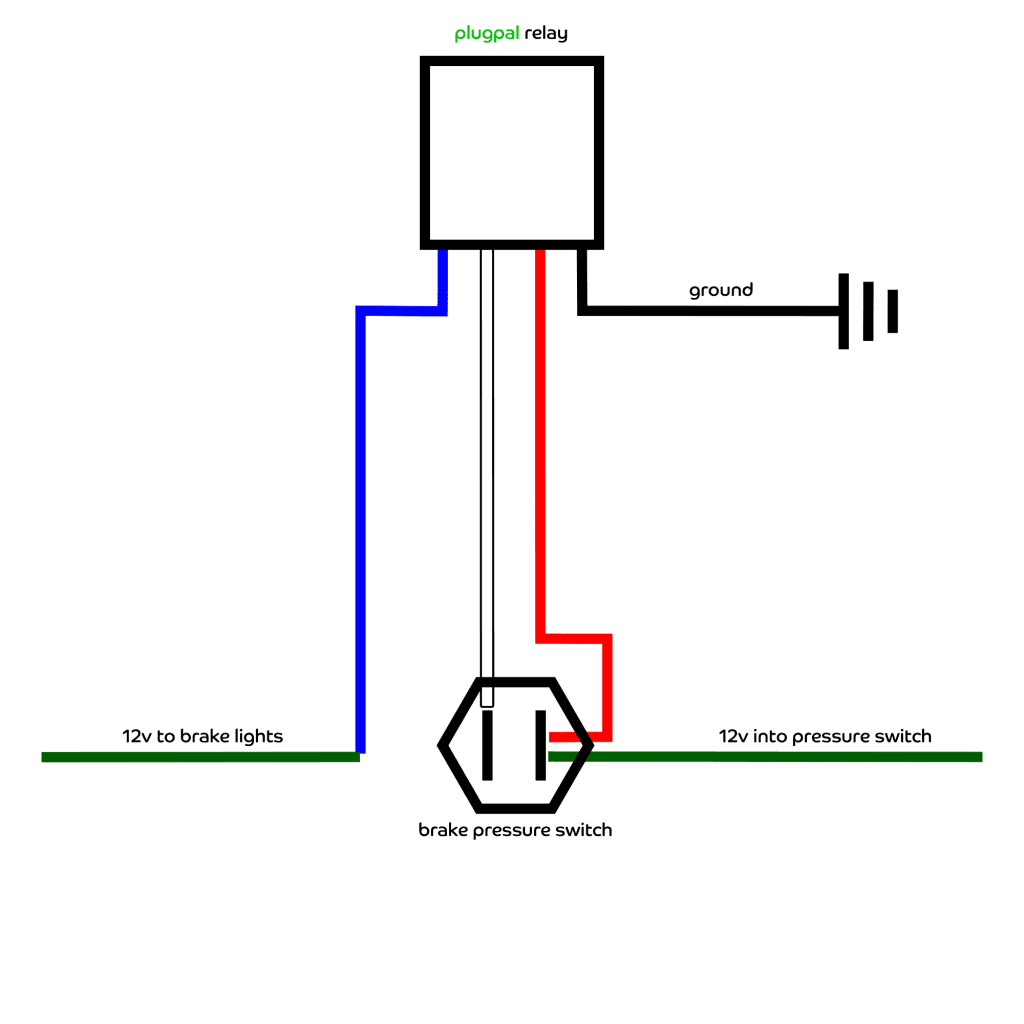
brake light pressure switch relay
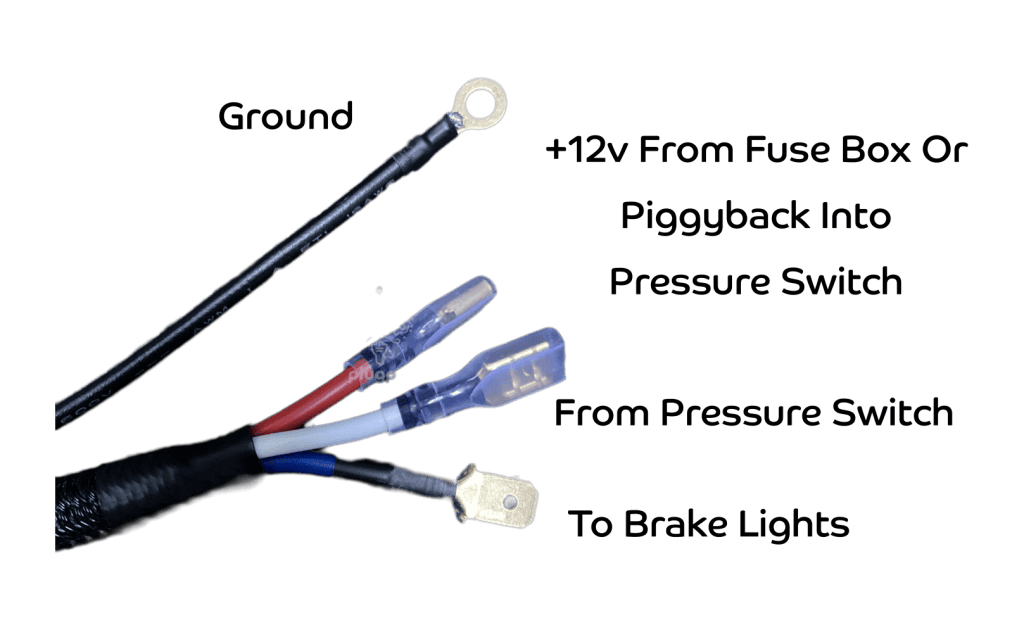
There are four connections to this item and it can be connected up in one of two ways:
- Black Wire – Connect to the vehicle chassis in a convenient location
- Red Wire – Connect to a 12v source, either from the existing 12v in to the pressure switch using the spade terminal piggyback connector or directly from the fuse box using the supplied extension cable and piggyback connector (if required) on the fuse box.
- White Wire – Connect to the other side of the pressure switch
- Blue Wire – Connect to the wire that did come form the pressure switch and goes to the brake lights
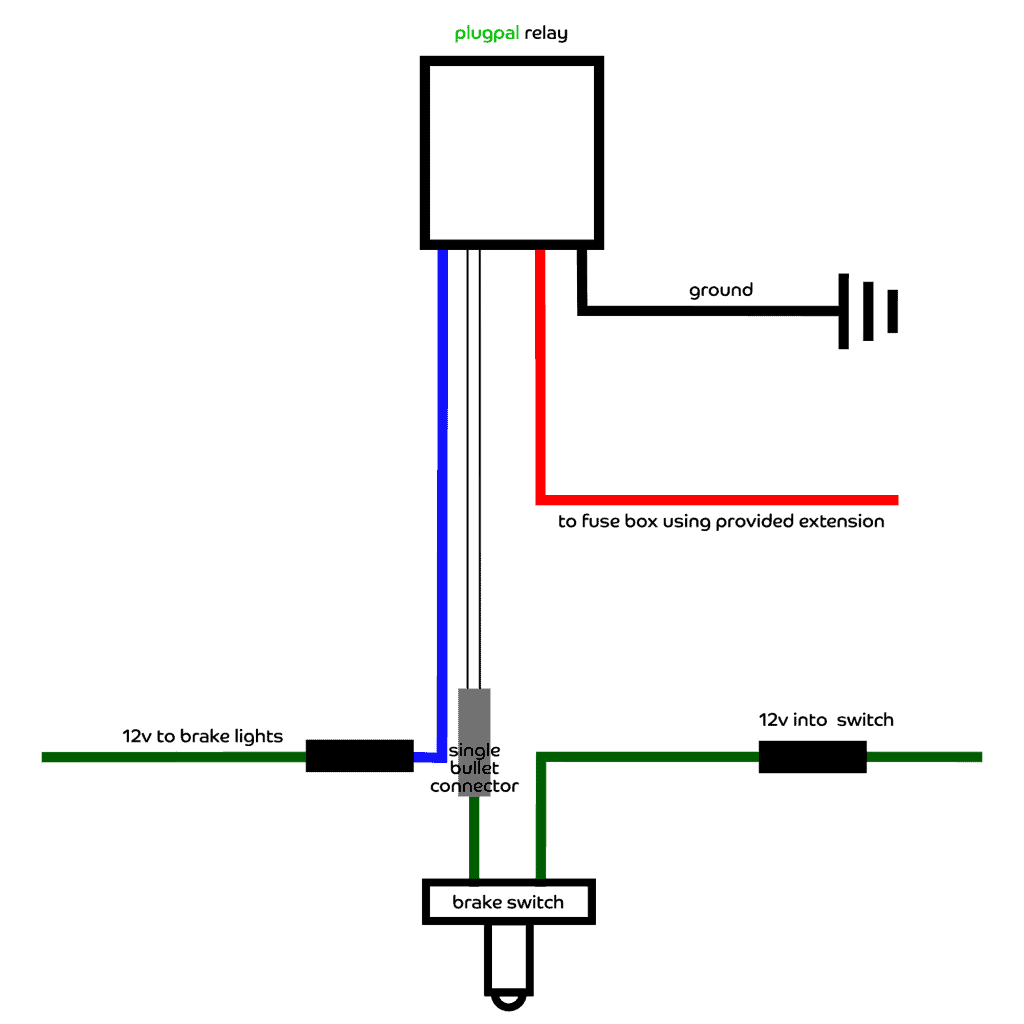
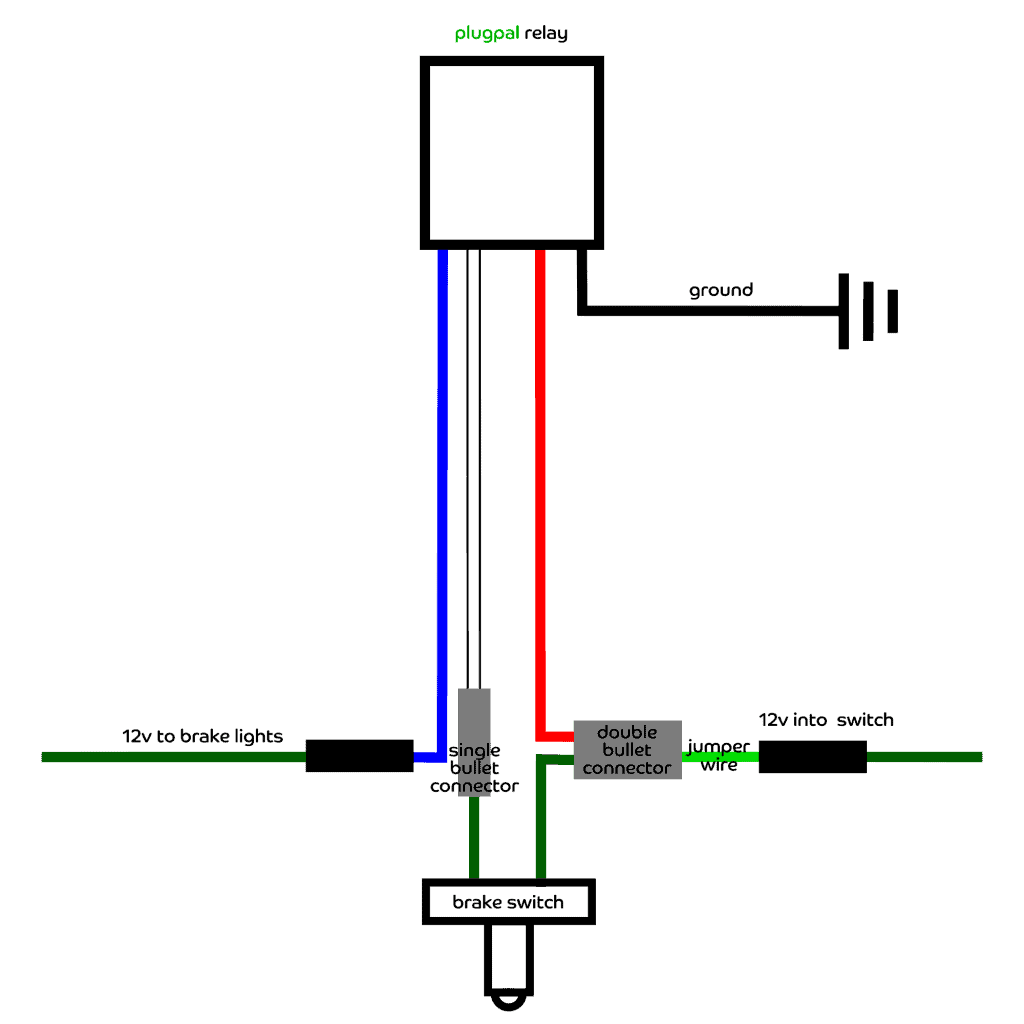
brake light switch relay
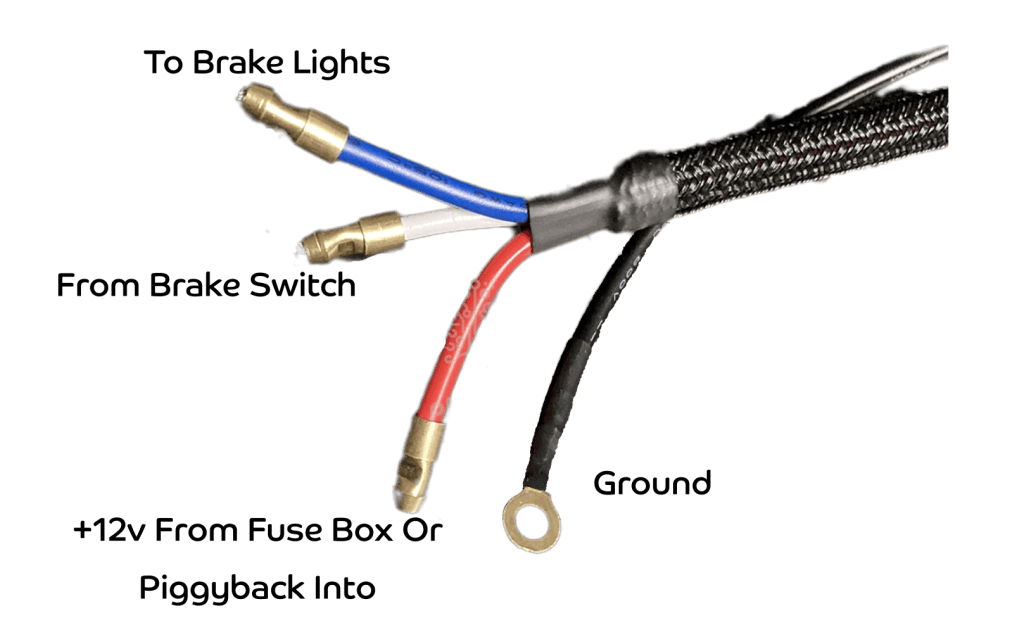
There are four connections to this item and it can be connected up in one of two ways:
- Black Wire – Connect to the vehicle chassis in a convenient location
- Red Wire – Either use the supplied extension cable to bring 12volts from the fuse box directly to the relay, or connect the double bullet connector to the incoming 12v wire on the vehicle loom using the supplied green jumper wire. Then, plug one of the switch wires and the red relay wire into the double bullet connector.
- White Wire – Using the supplied single bullet connector, join this wire to the second switch wire
- Blue Wire – Plug this wire into the connector that the second switch wire used to connect to, that goes to the vehicle brake lights
connecting by sharing the incoming 12v feed
The pressure switch has two wires, one a 12v feed and the other going to the brake lights themselves. You will need to identify which wire is which using a multimeter if you do not have a wiring diagram. Disconnect the wires one at a time so as not to confuse which is which.
Using the supplied spade piggyback connector, you will need to join the incoming 12v feed wire to the red wire on the plugpal brake light pressure switch relay.
Disconnect the wire from the other side of the pressure switch, the one that goes to the brake lights, and connect this to the blue wire on the relay harness. The white wire is then connected to the remaining pressure switch terminal and the black wire from the relay can be connected to ground.
connecting by sharing the incoming 12v feed
The brake switch has two wires, one a 12v feed and the other going to the brake lights themselves. You will need to identify which wire is which using a multimeter if you do not have a wiring diagram. Disconnect the wires one at a time so as not to confuse which is which.
When you have identified the incoming 12v wire on the vehicle loom, plug the supplied green jumper wire into the loom connector and the double bullet connector onto the other end of the jumper. Then, plug one of the switch wires and the red wire on the plugpal brake light switch relay into the double bullet connector.
Disconnect the wire from the other side of the switch and plug this into the white wire on the relay loom using the supplied single bullet connector.
The blue wire on the plugpal brake light switch relay can then be connected to the vehicle loom wire that the second switch wire used to plug into, the wire that leads to the brake lights.
connecting by providing a separate 12v feed
This is the better way of connecting the relay, but does require a small amount of extra work as it entails using the supplied extension lead to run from a 12v feed at the fuse box to serve the relay.
Again, you need to identify which wire on the pressure switch is providing 12v but this time you leave it connected. As before, the wire to the brake lights can be disconnected from the pressure switch and connected to the blue wire and the white wire can be connected to the pressure switch, the black being connected to the vehicle chassis to provide a ground connection.
The red wire is connected to the extension cable and then run to the fuse box and using the spade piggyback connector (if required) it is connected to a suitable feed.
connecting by providing a separate 12v feed
This is the better way of connecting the relay, but does require a small amount of extra work as it entails using the supplied extension lead to run from a 12v feed at the fuse box to serve the relay.
Again, you need to identify which wire on the loom is providing 12v to the switch but this time you leave it connected. As before, the wire to the brake lights can be disconnected from the switch and the blue wire on the relay loom plugged into the existing single bullet connector.
The white wire is connected to the second switch wire using the supplied single bullet connector.
The red wire is connected to the extension cable and then run to the fuse box and using the spade piggyback connector (if required) it is connected to a suitable feed.